

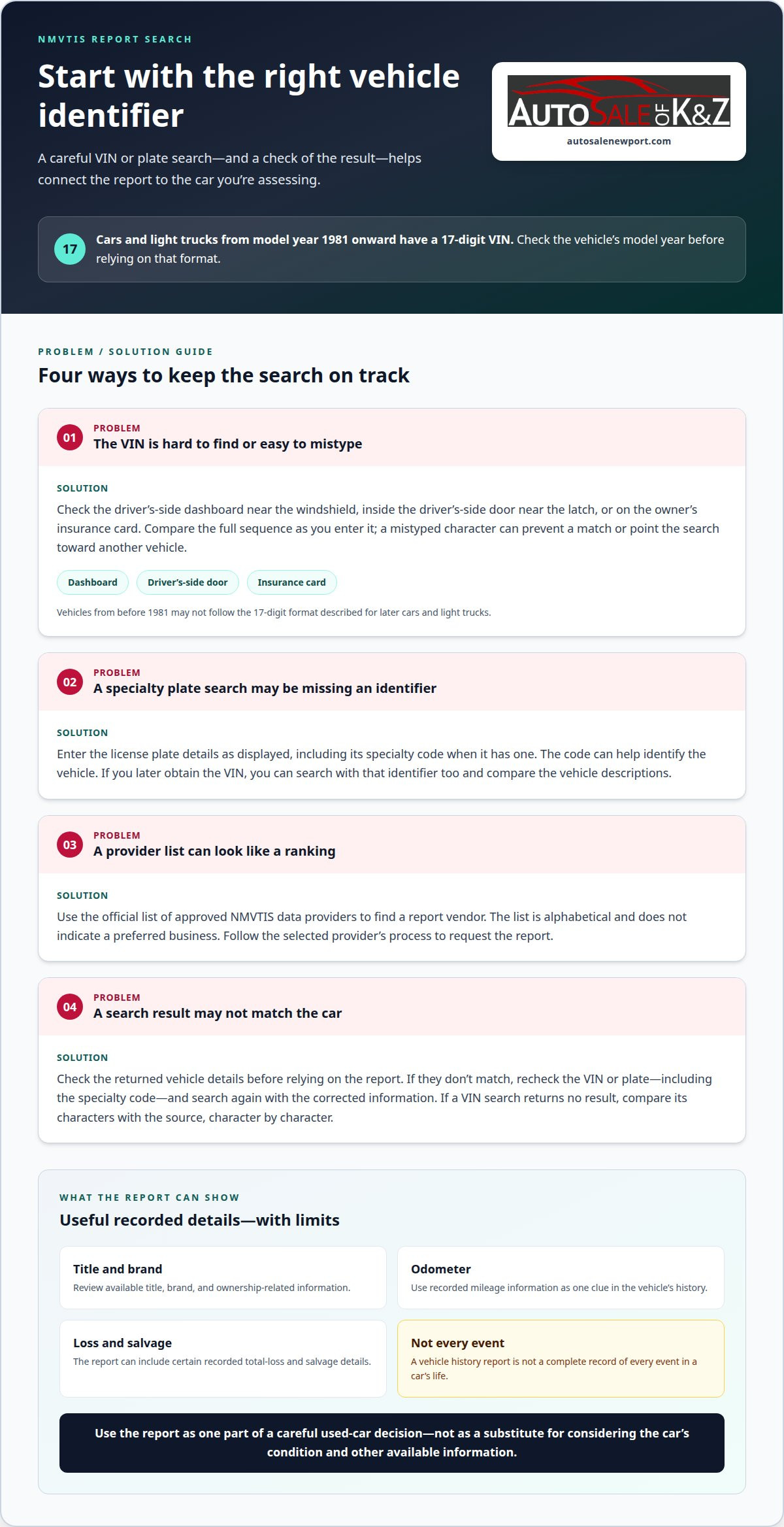
A vehicle history report is a useful first check, but it won’t tell you everything about a used car. To learn how to get a vehicle history report, start with the vehicle’s VIN or license plate and request a report from an approved NMVTIS data provider. Cars and light trucks from model year 1981 onward have a 17-digit VIN, according to the National Highway Traffic Safety Administration.
A vehicle history report can help you review available title, brand, odometer, and other recorded information, including certain total-loss and salvage records. If you search by license plate, enter its specialty code when it has one, as this can help identify the vehicle. Keep in mind that a report is not a complete record of every event in a car’s life.
This guide explains how to find the vehicle details you need, what an NMVTIS report covers, and which vehicles it focuses on. You’ll also learn what the report leaves out, how its records can vary, and how to use the information as one part of a careful used-car decision.
Key Takeaways
- Use a vehicle’s VIN or license plate to find an NMVTIS report, and include a specialty plate code when applicable.
- Review title, mileage, and recorded loss or salvage details as clues to a vehicle’s history.
- Check whether the car’s age fits the report’s coverage, and remember that a history report doesn’t include every kind of vehicle record.
- Use the report as one part of your used-car decision, not as a substitute for considering the car’s condition and other available information.
- If you’re weighing a trade-in while considering a Tesla Model 3, Tesla Model Y, or Toyota Prius, Auto Sale Newport offers Vehicle Trade-In Services.
Purchase a NMVTIS Vehicle History Report?
First identify the vehicle, then use the official list of approved National Motor Vehicle Title Information System (NMVTIS) data providers to find a report vendor. Approved providers make NMVTIS data available to consumers, dealerships, and financial institutions. This gives you a direct way to obtain a report without assuming every vehicle-history service provides NMVTIS data.
The provider list is alphabetical and does not indicate a preferred business. Choose a listed provider and follow its steps to request a report. Selecting a provider takes you from the U.S. Department of Justice website to that vendor’s service. Check the vehicle details you plan to enter so the search uses the intended VIN or plate information.
Find the vehicle’s VIN
Cars and light trucks from model year 1981 onward have a 17-digit VIN, according to the National Highway Traffic Safety Administration. Read the full sequence carefully: a mistyped character can send a search toward a different vehicle or prevent a match. The VIN may be visible on the driver’s side dashboard near the windshield, inside the driver’s side door near the latch, or on the owner’s insurance card.
Use one of those locations to locate the number, then compare the characters as you enter them. For example, if a dashboard VIN and insurance card are both available, matching the two helps catch a transcription mistake. A model-year distinction matters, too: vehicles from before 1981 may not follow the 17-digit format described for later cars and light trucks.
Search with a specialty license plate
If you identify a vehicle by its license plate, include the specialty code when the plate has one. The code can help locate the car. Enter the plate details as displayed rather than leaving out an identifying element, since a specialty plate may require that information to distinguish the correct vehicle.
Before choosing a search method, check which identifier you have. A VIN is useful when you can read it directly from the vehicle or its insurance card. A plate search can be practical when you have the plate information, especially if it includes a specialty code. Either way, check the vehicle identifiers in the result before relying on the report to make sure it matches the car you’re evaluating.
Keep the process focused: identify the car, select an approved NMVTIS provider, and submit the available information through its report process. The alphabetical provider list does not rank providers or express a preference, so don’t treat its order as a quality comparison. A correctly entered VIN or complete specialty plate details gives the search a clear starting point.
How to obtain a vehicle history report using a VIN or license plate
Choose the identifier you can enter accurately, then use it to request the report. The VIN and license plate are search inputs, so careful entry helps connect the record to the car you’re assessing.
Using a VIN to Obtain a Report
Enter the VIN in the report provider’s vehicle search field, following the format shown on the form. Before submitting, compare the characters with the VIN on the vehicle or its insurance card. A transcription error can affect whether the search finds the intended record.
When the report appears, check that its vehicle description matches the car you’re considering. Treat the VIN as the link between your search and the returned record, rather than assuming a result belongs to the vehicle simply because it appeared.
If the provider returns no result, check the VIN entry against the source, character by character. Correct any errors and submit the search again. This can help you distinguish an input mistake from a record that does not appear in the search.
Using a License Plate to Obtain a Report
Choose the license plate search option on the report provider’s form and enter the plate details as displayed. Include the specialty code for a specialty plate. It can help locate the car, so don’t omit it when the search asks for it.
Check the returned vehicle details before relying on the report. The plate should lead to information for the car you mean to assess, not just a result with a similar-looking identifier. If the details don’t match, recheck the plate and specialty code, then repeat the search with the corrected information.
A plate can be a useful starting point when you don’t have the VIN. If you later obtain the VIN, search with that identifier as another way to connect the report to the vehicle. Compare the vehicle descriptions in the results and check whether they identify the same car.
Use this sequence to keep the search organized:
- Select one identifier, either the VIN or license plate.
- Enter it carefully, including a specialty code when applicable.
- Review the returned vehicle details before relying on the record.
- Correct and resubmit the identifier if the result points to a different vehicle.
Once you’ve reviewed the report, its information can help frame decisions about keeping, selling, or replacing the car. If a sale or replacement is part of your next step, explore vehicle trade-in services.
Ownership, mileage, and title history
NMVTIS records can help you review a vehicle’s ownership-related, mileage, and title information. Read the entries as a timeline, then consider what the pattern may mean for the car.
Ownership History
Ownership information can show how a vehicle’s recorded history changed over time. Review the available entries in order, noting dates and related title events. A change in the record can prompt questions about when the vehicle moved between owners or jurisdictions.
Use the ownership timeline as context, not a verdict on the car. Several title events, for example, may reflect changes in registration history, but the report alone may not explain why each one occurred. Review the dates and related title details to better understand the sequence.
The National Motor Vehicle Title Information System is designed to protect consumers from fraud and unsafe vehicles and to help prevent stolen vehicles from being resold. Its records can support a broader review, but they don’t replace a careful assessment of the vehicle and its documentation.
Mileage History
Review odometer entries in chronological order. Successive recorded readings generally rise over time. If a later entry is lower than an earlier one, examine the timeline more closely rather than assuming the report explains the reason.
Check the dates beside each mileage entry, since a reading is more informative when compared with surrounding records. Readings recorded at different points, for example, can show whether mileage progressed consistently. A gap in entries does not, by itself, explain what happened during that period.
Compare the report’s mileage information with other available vehicle records and the odometer reading you observe. If the figures don’t align, note the specific entries and dates. This gives you a clear basis for understanding the discrepancy and deciding what additional context you need.
Title history adds another layer. Review title brands and other recorded title details in sequence, rather than as isolated labels. A brand can indicate an event affecting the vehicle’s title status. The report surfaces recorded information, while the timeline shows when entries appeared.
For a practical review, group the information by date: ownership-related events, odometer readings, and title entries. Then look for details that connect across categories. A mileage entry near a title event, for example, can help you understand the order of recorded events, but it does not prove a cause.
NMVTIS information is intended to help people assess vehicle history, but no single entry tells the whole story. Use the records to identify patterns, inconsistencies, and details that need context. This measured approach makes the report more useful when evaluating a used car.
Report coverage and vehicle eligibility
NMVTIS focuses on vehicles from 1981 onward, so a car’s model year helps determine whether it fits the system’s coverage. The report reflects information reported to the system, not every event in a vehicle’s life.
A report can be incomplete or outdated because records depend on reporting and update timing. NMVTIS data may be updated in real time, every 24 hours, or less frequently within a period of days; review service, repair, recall, and maintenance information separately because NMVTIS reports don’t include those records.
If the VIN is unavailable, search with the vehicle’s license plate through a report provider, including the specialty code for a specialty plate. An out-of-state title doesn’t change the basic search: use the VIN or plate, then review the returned title information, which may include records reported by states.
Which vehicles are covered?
NMVTIS focuses on vehicles from 1981 onward. That cutoff helps set expectations before you order a report. A vehicle outside that range may not have the same NMVTIS coverage, so don’t assume the system can provide a comparable history for every older car.
The system’s records depend on information reaching NMVTIS. In the United States, states, insurance companies, and junk and salvage yards are required by federal law to report information regularly. Reporting requirements for information from insurance companies and auto recyclers, including junk and salvage yards, began March 31, 2009.
Coverage depends on eligibility and reporting. A vehicle within the model-year range can still have gaps if relevant events have not reached the database or appeared in its records. Read the report as reported history, not a complete account.
What should you verify separately?
NMVTIS reports don’t include repair histories, recall information, or care and maintenance data. Review available service records and maintenance documentation separately, and look up recall information through an appropriate vehicle-safety resource. These sources can provide context the NMVTIS report does not.
For mileage and title details, compare the report entries with the vehicle documents available to you. If dates or readings don’t align, identify the specific discrepancy and seek supporting records. An unexplained gap is a reason to investigate the timeline, not proof of a particular event.
How do state records affect a report?
State title information contributes to NMVTIS, so an out-of-state title may appear in the vehicle’s record when reported. Use the same VIN or plate search process, then read state-related title entries alongside the vehicle’s other recorded history. The system is national, but its records depend on information reported to it.
Before relying on the result, match its vehicle details to the car and consider the dates of its entries. This helps distinguish the vehicle’s reported history from information that requires another record source or closer review.
Information included in a vehicle history report
An NMVTIS report brings together vehicle information reported to the system. Its value is in showing recorded events and title details, not every part of a car’s life. Read each entry for what it documents, then consider what you may need from other records.
Title information can include a vehicle’s title history and brand details. These entries help identify recorded changes in title status, such as a brand associated with damage or salvage. Read the terms alongside their dates and the vehicle identifiers to understand the record as a timeline, rather than as a label alone.
Odometer information can help you assess recorded mileage over time. Compare entries in sequence and note readings that seem inconsistent with the overall pattern. A lower later reading, for example, deserves closer review, but the entry alone may not explain the difference.
NMVTIS also includes information on vehicles determined to be total losses by insurance carriers, when the relevant entities report it. The U.S. Department of Justice says NMVTIS includes information about vehicles traded in under the Consumer Assistance to Recycle and Save Act of 2009 CARS Program when received by junk and salvage yards. These records can add important context to a vehicle’s history.
Use the report to identify recorded information, then separate those facts from questions it cannot answer. The Bureau of Justice Assistance, U.S. Department of Justice, states that NMVTIS reports don’t include vehicle repair histories, recall information, or care and maintenance data. A title record, for instance, does not provide a complete account of repairs after an incident.
For a focused review, organize the report into three groups:
- Title details: note title entries, brands, and dates.
- Mileage entries: compare readings in chronological order.
- Loss or trade-in records: identify reported events and their context.
Then consider what additional information could clarify the vehicle’s condition, such as repair or maintenance documentation. A clean-looking timeline does not establish that every event was reported, and a flagged entry also needs context. Use the report as one source in your decision, not as a substitute for records it doesn’t contain.
If the report helps you decide to move on from your current car, explore vehicle trade-in options as a next step.
Auto Sale Newport: Vehicle Trade-In Services
Auto Sale Newport offers vehicle trade-in services for drivers considering a change after reviewing a used car’s history. If the report raises questions about keeping your current vehicle, a trade-in may be a practical next step to consider alongside your other options.
Auto Sale Newport also offers vehicles such as the Tesla Model 3, Tesla Model Y, and Toyota Prius. If one of these models fits what you’re looking for, you can consider it while deciding whether to trade in your current car. A vehicle history report helps inform your decision, but it’s only one part of assessing a used vehicle.
If you’re ready to discuss a trade-in, contact Auto Sale Newport.
Make Your Next Vehicle Decision With Clarity
A report can inform your next move, but the decision is yours: keep the car, trade it in, or choose a different used vehicle. Knowing how to get a vehicle history report gives you a starting point for that decision, while your priorities help determine what comes next. If you’re considering a change, Auto Sale Newport offers Vehicle Trade-In Services and used options such as the Tesla Model 3, Tesla Model Y, and Toyota Prius.
Take the time you need to decide what matters most in your next vehicle. A trade-in may suit you if you’re ready to move on from your current car, while exploring another used model can help you weigh alternatives.
Contact Auto Sale Newport to discuss your next step. A thoughtful decision starts with the information you have, and you can move forward at your own pace.
Frequently Asked Questions
Where can I find the VIN?
Look for the VIN on the driver-side dashboard, visible through the windshield, or inside the driver-side door near the latch. It may also appear on the owner’s insurance card. If you’re viewing a car in person, the dashboard plate lets you read its identifier directly. Compare the characters carefully before entering them, especially if the plate is difficult to see.
What is a VIN?
A VIN, or vehicle identification number, is an identifier used to distinguish a specific vehicle. Cars and light trucks from model year 1981 onward have a 17-digit VIN, according to the National Highway Traffic Safety Administration. The sequence can contain both letters and numbers, so enter every character as shown. A typing error may lead to a search that doesn’t match the car you’re checking.
Where can I get a vehicle history report in the United States?
Consumers can obtain NMVTIS vehicle-history information through approved data providers. To learn how to get a vehicle history report, find the approved-provider listing through the U.S. Department of Justice and choose a business from its alphabetical list. The list does not rank providers or indicate a preference. Selecting a provider takes you to its report service, where you can follow the steps to submit the vehicle identifier.
How do I get a free vehicle history report using the VIN?
Start with the approved NMVTIS provider list and enter the VIN through a provider’s search process. The list identifies businesses that offer NMVTIS data, but it doesn’t establish that every report is free. Review the provider’s terms before entering payment details. If a no-cost report is offered, check what it includes and whether it provides the information you need for your used-car decision.
What information is included in a vehicle history report?
An NMVTIS report may include title information, odometer readings, and reported total-loss or salvage-related records. It can also include information about vehicles traded in through the CARS Program when junk and salvage yards receive them. Coverage depends on information reported to the system. NMVTIS reports don’t include repair histories, recall information, or care and maintenance data, so check separate records for those details.
How can I check a vehicle's title, accident, theft, and odometer history?
Use an NMVTIS report to review available title and odometer entries, along with reported total-loss information. A total-loss record does not give a complete account of every accident or repair, and the report excludes repair histories. NMVTIS is designed to help prevent stolen vehicles from being resold, but its report is not a complete theft record. Read each available entry with its date and context.
How do I get a vehicle history report before buying a used car?
Knowing how to get a vehicle history report before buying lets you review available records while assessing the car. Search its VIN or license plate through an approved NMVTIS provider, then match the report’s vehicle details to the car. If an entry raises a question, focus your follow-up on that detail. Also consider records outside the report, such as maintenance and repair documentation.


